Use case: If you’re iterating on the prompts behind your AI-generated content and want to know whether each change actually made it better, not just different.
Your product generates AI content for end users. Every time you iterate on the prompts behind that content, you hit the same blind spot: there is no objective signal telling you whether version B is genuinely better than version A on the dimensions that matter for your users
Say your team wants to make Grade 5 explanation texts more engaging. You update the prompt, the outputs feel livelier, and you ship. But “more engaging” for a language model often means longer sentences, more subordinate clauses, and higher-register vocabulary. The change that improved one dimension quietly pushed your passages out of grade band, and nobody catches it until a fifth-grade teacher flags a passage as too hard for her students.
How Learning Commons helps
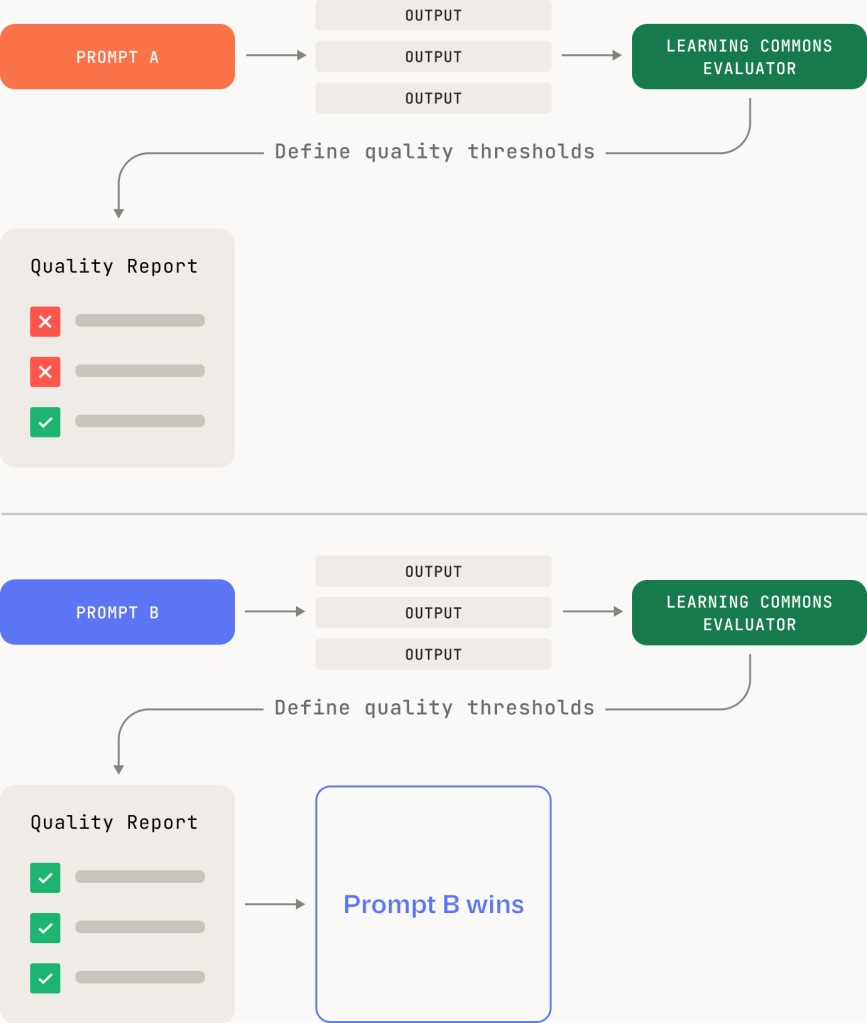
Run a set of outputs before and after a prompt change, and Evaluators score both against the same research-backed rubric, turning “it feels better” into a documented, side-by-side comparison. You see exactly which dimensions shifted and by how much, in language teachers and curriculum leaders already trust.
Available today:
- Text Complexity Evaluators assess text complexity dimensions including grade-level appropriateness, vocabulary, and subject matter knowledge, grounded in the SAP Qualitative Text Complexity rubric
- Feedback Evaluators assess the quality of AI-generated coaching feedback on student writing, currently validated for grades 8-9 and a specific task type
- Academic Standards Evaluators currently include Math Alignment, which judges whether a math question aligns to a supported state jurisdiction’s standards
- Durable Skills Evaluators assess skills like critical thinking through student writing, grounded in the Carnegie and ETS Skills Progressions framework
Each Evaluator returns a score and reasoning for every output you run through it. More evaluator families are in active development. See the current catalog and output format in the docs
How it works
What you can do with this
- Run outputs from before and after a prompt change through Evaluators. Compare grade band, vocabulary, and sentence structure across both versions.
- Set a quality baseline for your current prompts before making any changes.
- Treat Evaluator scores as a test suite. A prompt change only ships if scores hold or improve.
- Use Evaluator reasoning to find what in the prompt caused the shift, then revise it precisely.
- Build prompt evaluation into your workflow so quality is measured, not assumed.